Connect Your Online Store with GPAC ERP
Your website can take orders. GPAC ERP helps you manage what happens next—sales, inventory, customer balances, payments, accounting and business reporting in one connected workflow. The result is less duplicate entry, clearer stock visibility and a more reliable view of your online and offline operations.
Your online store should not operate separately from the rest of your business
As order volume grows, separate systems often create a familiar problem: the website shows one stock figure, the sales team works from another, and accounting waits for manual updates. That creates extra work and makes it harder to trust the numbers.
With GPAC ERP eCommerce integration, your online sales workflow can be connected with the same ERP environment used for inventory, invoicing, customer accounts, purchasing and financial reporting. Your storefront remains focused on selling; GPAC ERP becomes the operational system behind it.
“Sell online without creating a second version of your business records.”
Keep website orders, stock movement and back-office operations connected through a structured ERP workflow.
Connect online selling with the people who actually fulfill the order
A successful eCommerce operation does not stop at checkout. Your sales team, warehouse, finance team and management all need accurate information after the customer clicks “Buy.”
- Move confirmed online orders into a structured ERP sales process.
- Give operations clearer visibility of stock and warehouse movement.
- Keep invoicing, receivables and customer balances connected with sales activity.
- Reduce the need to copy the same order into multiple systems.
What GPAC ERP can connect with your online sales process
Integration is designed around the business data your team actually uses every day—from customer orders and item availability to invoices, payments and management reports.
Online Orders
Bring customer, item, quantity, delivery and order information into a structured sales workflow instead of retyping orders manually.
Inventory & Availability
Connect online selling with stock records so teams can work with clearer visibility of item movement, warehouse balances and available inventory.
Explore Stock Management →Sales & Invoicing
Use confirmed eCommerce transactions as part of your sales process, including customer records, invoices, returns and receivable tracking.
Explore Sales Management →Payments & Customer Balances
Keep payment status and customer balances visible alongside sales activity, helping finance teams follow up without relying on separate spreadsheets.
Explore Accounting →Purchasing & Replenishment
Use inventory and sales information to support purchasing decisions, supplier management and replenishment planning as demand changes.
Explore Purchase Management →Management Reporting
Review online and operational activity through connected sales, stock, receivable and financial reports instead of consolidating data manually.
From eCommerce order to ERP reporting in one business flow
The exact process is configured around your website, order lifecycle, payment process and operational rules. A typical integration follows this sequence.
Customer Orders Online
The customer places an order using your eCommerce website and provides the required order and delivery information.
Order Data Is Transferred
Relevant order data is passed to GPAC ERP through the configured integration method.
Sales Workflow Begins
The order can enter the agreed sales process for review, confirmation, invoicing or fulfillment.
Stock & Accounts Update
Confirmed transactions can update inventory and related financial records according to your configured workflow.
Management Reviews Results
Teams use GPAC ERP reports to review sales, stock, customer balances and operational performance.
Business data that can be included in an eCommerce ERP integration
Every implementation is different. The table below shows common data flows that can be considered when planning the integration.
| Business Data | Typical Direction | How It Helps | Implementation Note |
|---|---|---|---|
| Products / Items | ERP ↔ Website | Helps keep product references and item information aligned between systems. | Fields and ownership rules are agreed during implementation. |
| Stock Availability | ERP → Website | Supports clearer online availability based on operational stock records. | Sync timing depends on the chosen integration design. |
| Customer Orders | Website → ERP | Reduces duplicate order entry and moves online sales into the ERP workflow. | Order status mapping is configured to match your process. |
| Customer Information | Website → ERP | Creates a more centralized customer record for sales, receivables and service follow-up. | Only required business data should be exchanged. |
| Payment Status | Website / Gateway → ERP | Helps finance teams distinguish paid, pending, partial or unpaid orders. | Availability depends on payment provider and integration access. |
| Order / Fulfillment Status | ERP ↔ Website | Can help customer-facing and back-office teams work from the same order lifecycle. | Status synchronization is defined during scope planning. |
| Returns / Adjustments | Configured Workflow | Supports more consistent handling of returns, stock effects and customer balances. | Business rules vary by return and refund process. |
Online sales become useful business information inside GPAC ERP
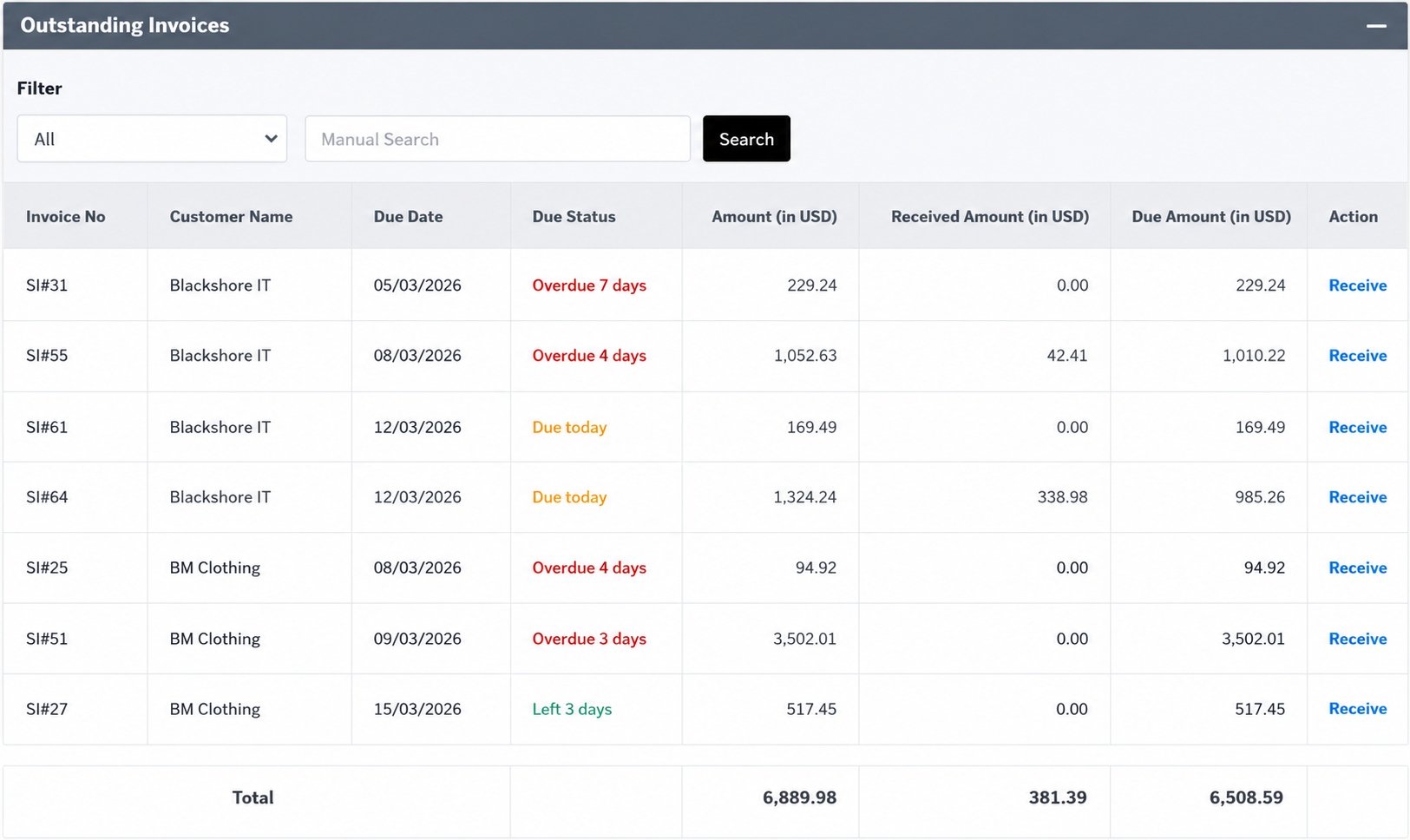
Once sales and customer transactions are recorded in the ERP workflow, teams can work with operational and financial views such as outstanding invoices, customer balances and follow-up actions.
Better control without adding more manual work
eCommerce growth should not mean more spreadsheets, more reconciliation and more duplicate entry. A connected ERP workflow gives each team a clearer view of the same business activity.
- Reduce repeated data entry between the website and back office.
- Improve visibility of stock movement and product availability.
- Connect sales activity with customer balances and financial records.
- Support both online and offline selling through one operational environment.
- Give management a more consistent base for reporting and decision-making.
One ERP for businesses selling online, in-store and through distribution channels
GPAC ERP can support organizations that need more than a standalone web store. It brings operational processes together as sales channels and transaction volumes grow.
Connect web orders with inventory, invoicing, customer records and reporting.
Manage online orders and physical-store transactions with a shared stock and ERP environment.
Support customer-specific sales processes, inventory control, receivables and structured order handling.
Combine online demand with dealer, delivery, inventory and collection workflows.
A practical path from requirements to a working integration
Instead of forcing every business into the same connector, we define the data flow and operational rules first. That keeps the implementation aligned with how your team actually works.
Process Review
We review your website, order flow, products, customers, stock, payment process and existing ERP requirements.
Integration Scope
We agree which data should move between systems, which system owns each field and when synchronization should occur.
Configuration & Development
The required API mapping, workflow configuration and integration logic are implemented for the approved scope.
Testing & Go-Live
Order, inventory, customer, payment and reporting scenarios are tested before the integration is moved into production.

eCommerce ERP Integration FAQ
Common questions businesses ask before connecting an online store with GPAC ERP.
What is eCommerce ERP integration?
eCommerce ERP integration connects an online store with back-office business processes such as sales, inventory, customer accounts, purchasing and accounting. The goal is to reduce repeated data entry and keep operational records more consistent across systems.
Can GPAC ERP receive orders from an eCommerce website?
Yes, order information can be included in an integration where the eCommerce platform provides the required access and the data flow is included in the agreed project scope. The exact order-to-invoice workflow is configured for the business process.
Can website stock be connected with GPAC ERP inventory?
Stock availability can be part of the integration. The direction, timing and inventory rules depend on the website platform, warehouse structure and the way stock is managed in GPAC ERP.
Does eCommerce integration connect with accounting?
GPAC ERP connects sales, inventory and accounting within the ERP workflow. How an online transaction affects invoices, receivables, payments and financial records depends on the approved accounting and integration setup.
Can GPAC ERP support both online sales and physical-store POS?
GPAC ERP includes connected sales, inventory and POS capabilities. This allows a business to design an operational model that covers eCommerce and physical-store transactions while keeping back-office data within the same ERP environment.
Is every eCommerce integration the same?
No. Integration requirements vary by platform, API access, payment gateway, product structure, order status, fulfillment process, warehouse setup and reporting needs. GPAC defines the technical and business scope before implementation.
How do we start an eCommerce ERP integration project?
Start with a discussion of your website, current workflow and the data you want to connect. From there, the integration scope, required API access, implementation approach and testing plan can be defined before development begins.
Bring Your Online Store and Business Operations Together
See how GPAC ERP can connect eCommerce orders with sales, inventory, accounting, purchasing, POS, distribution and reporting through a workflow designed around your business.